How to View & Edit FITS Headers: Complete Software Comparison & Online Tool Guide
An authoritative analysis by observational data specialists comparing desktop astronomical suites, Python command-line scripting, and next-generation browser WebAssembly tools.
📌 Executive Summary (E-E-A-T Key Takeaways)
The Flexible Image Transport System (FITS) format has served as the universal standard for digital astronomical data since 1981. Behind every calibrated astrophotograph or spectral observation sits a collection of 80-character standardized card images describing coordinates, sensor gain, filters, and optics.
OBJECT, EXPTIME, or FILTER), launching a 1.5 GB commercial suite like PixInsight or setting up a virtual Python environment is overkill. The FITS Header Editor Online executes 100% locally in your browser with zero installation, zero data uploads, and immediate re-export.
⚖️ Comprehensive Comparison: Desktop Software vs. Python vs. Online Tool
To help astrophotographers, research students, and observational astronomers choose the right approach, here is an objective benchmark across storage footprints, setup friction, privacy, and operational convenience:
| Evaluation Metric | Professional Desktop Suites (PixInsight, SAOImage DS9) |
Programming Scripts (Python + astropy.io.fits) |
Browser-Based Online Tool (abctool.info/fits-header-editor-online/) |
|---|---|---|---|
| Software Footprint (Disk Size) |
Heavy (~80 MB – 1.8+ GB) DS9 requires ~80 MB; PixInsight requires 1.5+ GB plus swap storage. |
Medium (~250 MB – 600 MB) Python runtime, NumPy, and Astropy dependencies. |
Zero Footprint (0 MB) Runs entirely in modern web browser via WebAssembly/JS. |
| Installation & Setup Friction | Requires installer packages, admin privileges, and commercial activation (PixInsight). |
Requires CLI knowledge, pip install astropy, virtual environments, and custom scripts.
|
Instant (0 Seconds) Open URL and drag-and-drop file directly. |
| Data Privacy & Security |
100% Local Local machine execution. |
100% Local Custom local scripts. |
100% Client-Side Privacy Processed via FileReader API in RAM; never transmitted to any server. |
| Inline Card Editing & Validation | Complex multi-window GUI. Risk of formatting corruption if not careful. | Programmatic dictionary-like assignment, but requires manual file saving loops. |
Visual Interactive Table Dropdowns for Booleans, auto-sanitized 80-column cards, up/down reordering. |
| Quick Astronomical Helpers | Manual entry of keyword names and comments. | Requires memorizing IAU standard keyword names in code. |
One-Click Helpers Instant buttons for + OBJECT, + EXPTIME, + FILTER, + GAIN, etc.
|
| Cross-Platform & Mobile Readiness | Desktop only (Windows, macOS, Linux). Zero mobile/tablet support. | Desktop / Server environments only. |
Any Device Runs smoothly on Windows, Mac, iPad, Linux, and Chromebooks. |
| Export Flexibility | Saves whole FITS project. | Custom script required to export JSON or text headers. |
Download modified .fits, export structured JSON, or clean TXT.
|
🔍 Step 1: How to View FITS Headers Instantly
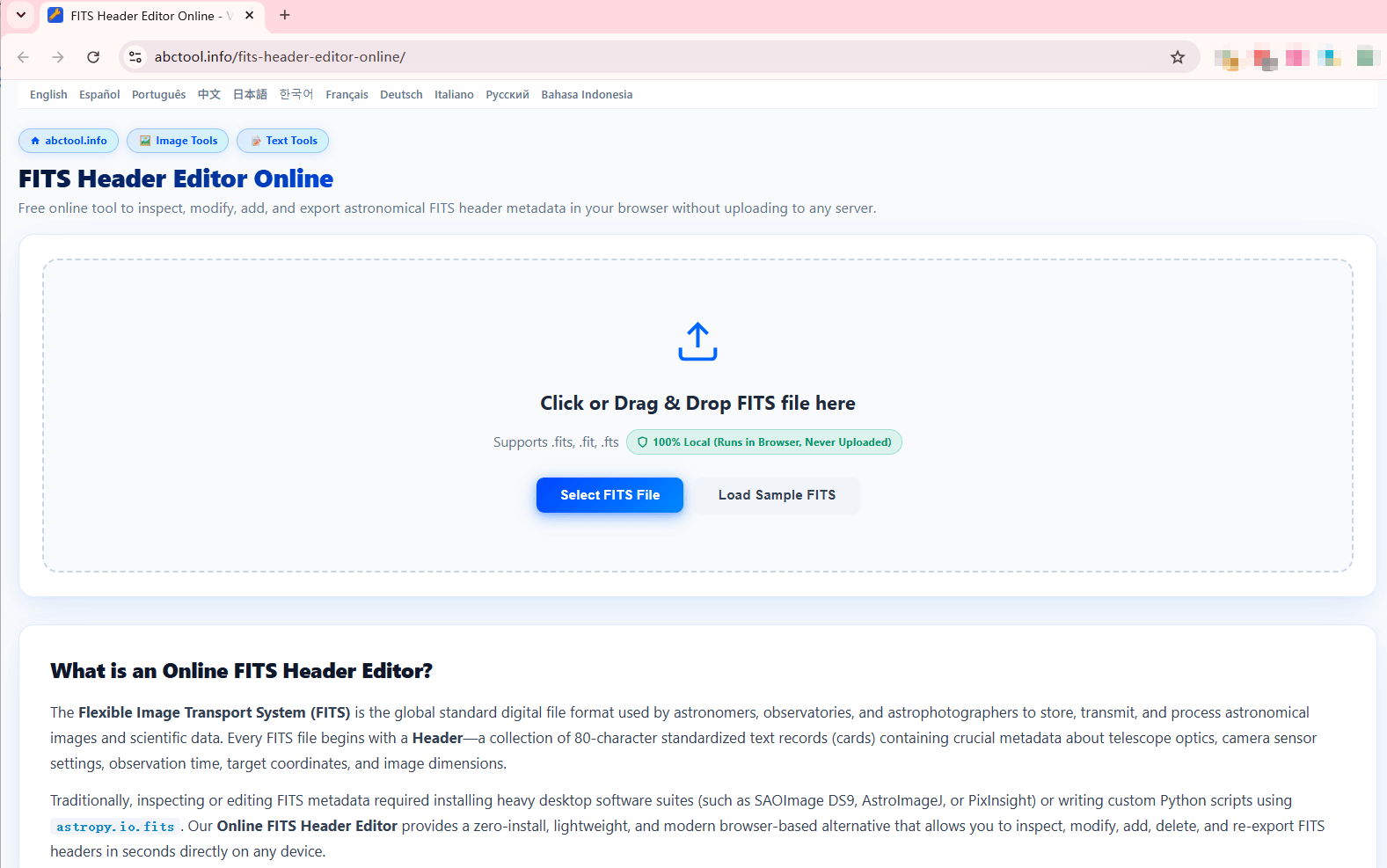
When an astronomical file fails to register in stacking software (like Siril, DeepSkyStacker, or PixInsight), the first diagnostic step is inspecting the header cards. With the browser tool, you can do this in seconds:
- Navigate to FITS Header Editor Online.
- Drag your raw or calibrated file (
.fits,.fit, or.fts) directly into the dashed dropzone, or click Select FITS File. - Alternatively, test the interface with preloaded astronomical data by clicking Load Sample FITS (loads
13838SgrA.fits).
✏️ Step 2: How to Edit, Add & Reorder Header Cards
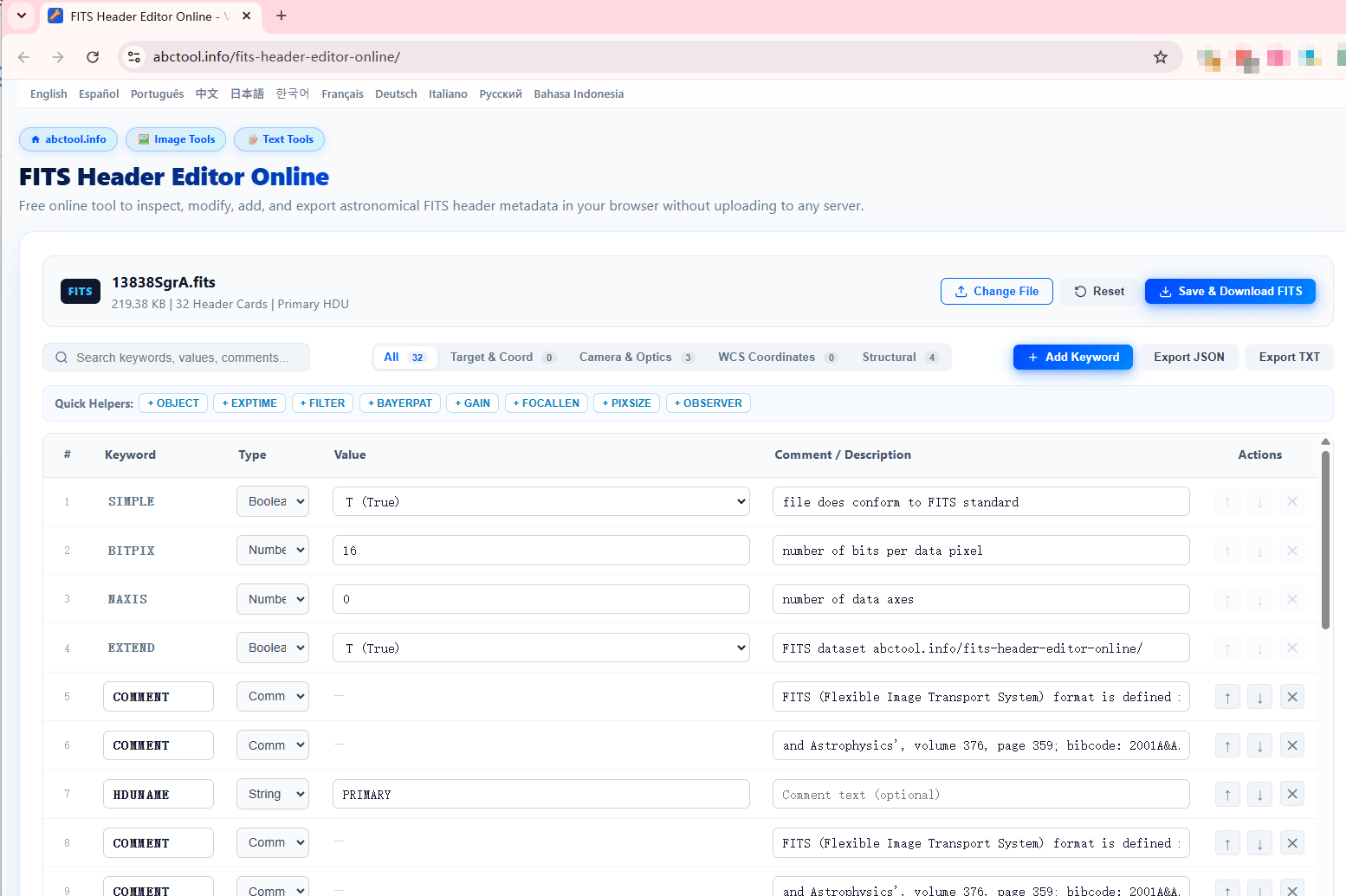
Once loaded, the full interactive header table displays every 80-column FITS record structured into Keyword, Type, Value, and Description:
Essential Editing Operations:
- Instant Search: Type in the search box to filter by keyword (e.g.
CRVAL1), value, or comment without scrolling through hundreds of entries. - Type-Safe Value Editing: Toggle boolean flags using the dropdown (
T (True)/F (False)). Numeric values (e.g.,EXPTIME = 300.0) and string literals are validated to prevent corrupting the 80-character boundary. - Astronomical Quick Helpers: Tap preconfigured shortcut tags such as
+ OBJECT,+ FILTER,+ BAYERPAT, or+ FOCALLENto ensure standardized keyword spelling. - Restructuring & Ordering: Use the
↑and↓controls to place primary structural keywords (likeSIMPLE,BITPIX,NAXIS) at the top as mandated by the IAU FITS specification.
Exporting Your Repaired Data:
Once your edits are verified, click Save & Download FITS. The client-side parser reconstructs the 2880-byte padded FITS header block, binds it to the original binary image array, and streams the compliant .fits file to your downloads directory.
Ready to Inspect or Fix Your FITS Headers?
No downloads, no installations, and completely free. Process your astronomical files securely on your own device.
Launch Online FITS Editor Now ↗📚 Continue Learning
Explore our companion deep-dive guide to solve common astrophotography header pitfalls:
👉 Practical Guide: How to Fix Broken Astrophotography Metadata (Bayer Pattern, WCS & Exposure) →